
Better AI Prompts: 10 One-Line Upgrades That Instantly Improve Your Answers

Last time I wrote about AI prompts, I covered the basics: giving the AI a role, adding context, and letting it ask you questions instead of guessing. If you haven’t read that one yet, it’s worth a look before this, but you don’t need it to follow along here.
This post is the next level up. These are ten simple AI prompt additions you can drop into any AI conversation, in ChatGPT, Gemini or Claude, that can vastly change the quality of what comes back. None of these require you to understand how AI works. You just need to know what to type.
Sharpen What You Already Know
Two of the tips from my last post get a serious upgrade here.
I told you to give the AI a role. Now get specific about it. Instead of “you’re a financial advisor,” try “act as a [specific] expert with 20 years of experience.” Swap the bracket for whatever fits: an estate lawyer, a paediatric nurse, a mechanic who specialises in German cars, an interior designer. The vaguer the role, the vaguer the answer. Give it a job title and a career length, and it responds like someone who’s actually done the work.
I also told you to let the AI ask you questions. Here’s the version that gets you further: “ask me one question at a time until you have enough to nail this.” One question at a time is the whole trick. Ask for everything upfront and you’ll get a wall of questions that you’ll probably half answer and move on. One at a time keeps it a conversation, not a form.
AI Prompts That Stop You Getting a Flat Answer
“Give me three options: conservative, moderate, and aggressive.” This is the one I use most (career decisions, renovation quotes, which bottle of wine to bring to a dinner party, it works for all of it). AI defaults to giving you the safest, most middle-of-the-road answer it can. Ask for a range and you actually get to see your options, from the cautious version to the “go big” version, and pick the one that fits your actual appetite for risk.
“What am I not asking that I should be?” This one catches you off guard the first time you use it, in a good way. You’ve asked your question, you think you’ve covered it, and then it tells you the thing you didn’t know to ask about. Contract terms, that financial decision you’ve been putting off, the fine print on a warranty, this prompt finds the gap.
“Don’t answer immediately. Think through the problem step by step.” AI wants to give you a fast answer. Slowing it down, forcing it to reason through the problem before it responds, produces noticeably better results. Use this for anything with more than one moving part.
Prompts for When You Feel Out of Your Depth
“Explain it like I’m 10.” I use a version of this constantly, especially when I’m troubleshooting something on my website or learning a new tool. I might be “tech savvy” but I don’t actually have a technical background. I need things broken down step by step, in plain language, without the assumption that I already know what a plugin or a cache is. This prompt gets you there fast, on any topic, not just tech.
“Turn this into a step-by-step checklist I can actually follow.” Once you’ve got a good answer, this turns it into something usable. Instead of a paragraph you have to re-read three times, you get an actual list of steps in order. This is one of the most useful prompts on this list, and one of the easiest to remember.
The Bonus Round (Worth the Extra Effort)
These AI prompts make take a bit more setup, but they earn it.
“Here’s an example of what great looks like. Match this quality.” Paste in something you love, a piece of writing, a layout, an email that got a great response, and ask the AI to match it. AI learns far better from examples than from adjectives. Telling it to be “punchy” or “elegant” means nothing. Showing it does.
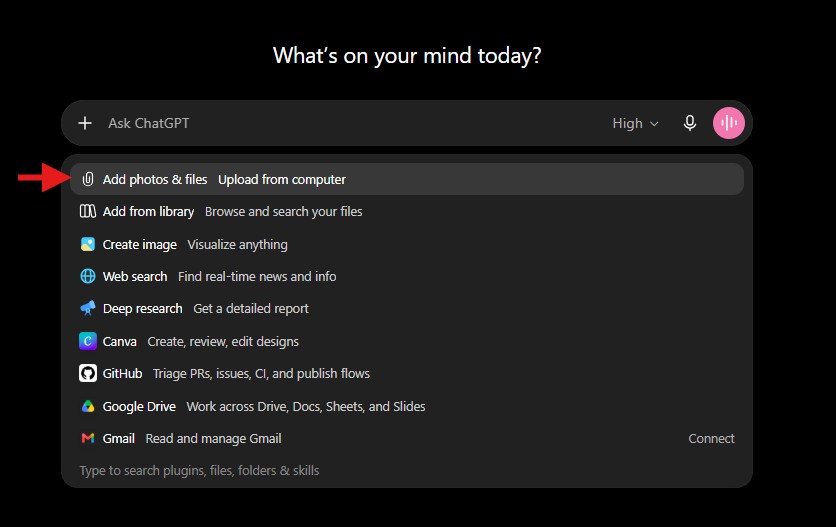
Note: to provide examples, you can either attach a file (click on the ‘+‘ in the chat-box and a dropdown menu will appear. Select “Add photos & files Upload from computer”), or you can do a screenshot and copy/paste it directly into the chat-box
“Rewrite this to sound like me: [paste two things you’ve written].” Give it a couple of samples of your own writing and ask it to match your voice. This is the prompt to use before you send anything AI helped you write. Nobody wants an email that reads like it came from a robot pretending to be their friend.
“What would [specific person] say about this?” Steve Jobs. Brian Gluckstein. Warren Buffett. Ina Garten. A lawyer. A doctor. Whoever has the perspective you need. This is the fastest way to pressure-test an idea from an angle you wouldn’t have thought of yourself.
Try One Today
You don’t need all ten. Pick two or three that match how you already use AI and try them on whatever you’re already asking it today. You’ll notice the difference by the first reply.
Save This List
Copy these into your notes app so they’re on hand whenever you need them.
- Act as a [specific] expert with 20 years of experience.
- Ask me one question at a time until you have enough to nail this.
- Give me three options: conservative, moderate, and aggressive.
- What am I not asking that I should be?
- Don’t answer immediately. Think through the problem step by step.
- Explain it like I’m 10.
- Turn this into a step-by-step checklist I can actually follow.
- Here’s an example of what great looks like. Match this quality.
- Rewrite this to sound like me: [paste two things you’ve written].
- What would [specific person] say about this?
If you missed the first post in this series, start here: How to Write AI Prompts That Actually Work: Beginner’s Guide.
Haven’t tried AI yet? It’s not too late! There are lots of free versions; choose one and play around with it. Start with a simple task like a recipe for dinner.
Here are the links for the most common AI models:
Share this post with a friend:
Copy LinkLink copied!