Kindle Scribe Review: 5 Ways I’m Using and Loving It
Updated on January 5, 2026
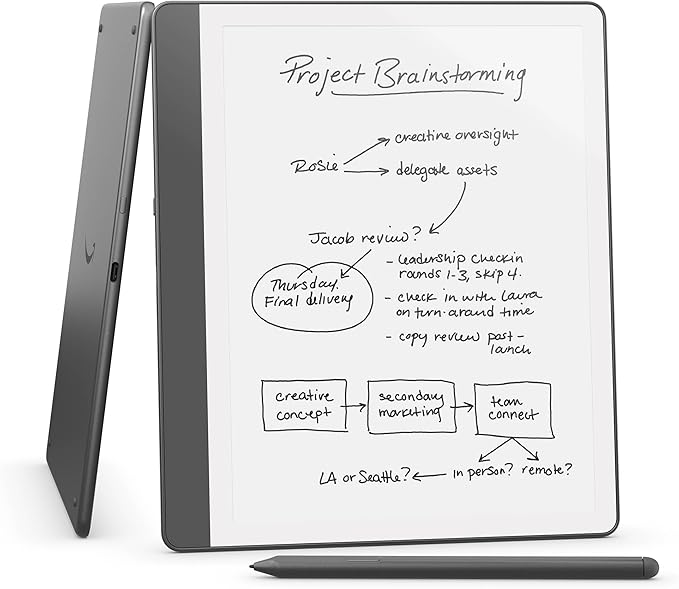
Every once in a while, you buy a piece of tech that doesn’t just sit around collecting dust but actually becomes part of your daily life. For me, that’s been the Amazon Kindle Scribe. Spoiler: it isn’t cheap, but I’d absolutely buy it again. In fact, I’d recommend it to a friend in a heartbeat. It’s lightweight, easy to carry, and gives me that perfect mix of productivity and pleasure.
In this review, I’ll share the five ways I’ve been using and enjoying it most, along with some of the standout features that I think make it worth recommending.
1. Compact and Lightweight: Easy to Carry Anywhere
One of the best features is its portability. It fits right into a medium-sized purse or tote bag, which means I can take it from coffee shops to appointments without feeling like I’m lugging around a mini laptop. Whether I’m waiting at the dentist or sitting in Starbucks, it’s always there, ready to go.
2. Kindle Scribe Writing Experience Feels Like Paper
I’m a pencil-and-paper girl at heart. I love the tactile feel of jotting things down, and I worried this would feel like “writing on glass.” But the Scribe writing experience is surprisingly natural. The stylus has just enough resistance to mimic paper, and there’s no lag at all.
I’ve been using it for everything from quick notes and lists, to brainstorming ideas, to bigger planning sessions (eg. website design enhancements or function upgrades), and it feels like a real notebook, without all the clutter. I also love being able to draw a quick diagram to further complement my thought process.
Bonus feature: something else I have come to appreciate (or should I say, others appreciate) is the handwriting-to-text conversion. I can jot down quick notes in my own handwriting then with one tap, have them converted into clean, typed text. It works surprisingly well, even with my not-so-perfect penmanship. For longer notes or lists I want to share, this makes them much easier to read.
3. Perfect for Notes and Lists
Confession: I am a chronic list-maker. Grocery lists, to-do lists, packing lists, you name it! The Scribe makes list-making and note-taking effortless.
Instead of sticky notes on the fridge or on my laptop, or endless scraps of paper at the bottom of my bag, I now have one organized place to keep everything. I can actually find my lists later. And no more frantically searching for post-it notes!
And here’s an unexpected bonus: you can email your notes and lists directly from the Scribe. That means I can send a grocery list to myself or my husband before heading to the store, or share a to-do list with my family. It turns my scribbles into something instantly usable, without having to re-type a single thing.
4. Kindle Scribe for Reading Books
Like most people, I’ve been trying to read more and scroll less. The Scribe doubles as a traditional Kindle, so I have access to all my ebooks in one sleek device. Because I have Amazon Prime, I also get a rotating library of free books, which is a huge perk.
And here’s what I love: when I’m in reading mode, it feels like a Kindle-lightweight, glare-free, and easy on the eyes. But if I want to highlight, mark-up passages, or jot notes in the margin, the Scribe makes it effortless.
5. A Multi-Purpose Tool for Work and Life
Beyond lists and reading, the Scribe is a versatile digital notebook. I use it for brainstorming, journaling, and sketching out blog ideas. Some people use it for annotating PDFs, signing documents, or reviewing reports. I haven’t used it much for that yet, but it’s nice to know I can.
For anyone balancing work, school, or family life, the Scribe adapts easily to different needs.
Other Kindle Scribe Pros and Cons:
Battery life: impressive; I use it daily but only charge it about once a week.
Distraction-free: unlike a tablet, I’m not tempted by email or social media.
Better focus: one device dedicated to reading and writing makes me more intentional with my time.
Cons: the price tag is high compared to a regular Kindle, and the case and accessories can add extra cost.
Final Thoughts: Is the Kindle Scribe Worth It?
In my opinion, yes. Is the Kindle Scribe a splurge? Absolutely. But for me, it’s worth every penny. It’s part Kindle, part notebook, and part personal assistant-and it has genuinely helped me stay more organized and motivated to read.
I’d buy it again in a heartbeat, and I’d recommend it to a friend who loves to read, write, or stay organized.
If you’ve been curious about it, you can check out the Kindle Scribe on Amazon here.
Tip: I feel like Amazon runs regular promotions on their own technology products, so you might want to watch for a sale.
Interested in other tech products I use/love, check out my Smart Travel Tech blog article here.
Disclosure: This post may contain affiliate links. If you click through and make a purchase, I may receive a small commission at no cost to you. Thank you for supporting this blog!
Share this post with a friend:
Copy LinkLink copied!